
NixOs is the new Arch Linux¹, and I use NixOs by the way; My laptop and my home server are both declarative. Naturally I’ve been looking for my next fix and lucky me when I found a perfectly fresh router in the trash room in my apartment complex.
I knew three things immediately:
- I should put some Linux based firmware on it.
- Somehow Nix should be used to configure it.
- It should in theory be possible to configure the router without ever being on the same network or touching it.
Picking the firmware
As someone who knows nothing about router firmware I gathered two things:
- OpenWRT would probably be the most suitable firmware for my usecase (based off of vibes only)
- This particular router I found does not work well with OpenWRT. DD-WRT is the way to go.
About DD-WRT
DD-WRT is a batteries included kinda situation and the primary mode of configuration is the web UI. For the hackerwoman there is also the option of SSHing onto the router (after enabling SSH via the web UI) and using the command nvram get and nvram set to read and write key-value pairs onto FLASH. For instance nvram set filter off disables the firewall, nvram set ttraff_enable 1 enables the ttraff deamon.
Attempt #1 — it’s all get’s and set’s
Behind the scenes, NVRAM is how the router is configured, and it’s pretty declarative already. What should happen is we should evaluate the Nix config, and then nvram set as appropriate to get the router into the state it should be in.
This method works relatively well, but I ran into problems as I tried to upgrade firmware declaratively. The recommended way to upgrade firmware is of course the web UI, but it’s also possible to scp the firmware onto the router, and then write newfirmware.bin linux. The problem is that no matter how you do it, the official DD-WRT way is to then do a hard reset of the router (by holding down physical reset button, unplugging the cable, re-plugging the cable, etc), clearing all NVRAM, this giving the new firmware a blank slate to work on as it boots up for the first time. If you do not clear all NVRAM, you risk some key-value pair that made sense with the old firmware being missinterpreted by the new firmware and totally tripping DD-WRT over.
Naturally some people get away alright with a policy of keep existing NVRAM for “small” upgrades and then hard reset and start over every now again when there are “big” upgrades, I want something that can in theory work always, but I just couldn’t figure out any way to do it using nvram get and nvram set as my primitives.
Attempt #2 — Binary formats
I dug around on forums.. and then on the 18GB SVN repo comprising the DD-WRT source code, not to any success. At some point I should understand the DD-WRT codebase somewhat, but boy oh boy do I think that would take some work. I also dug around on the routers file system, eventually finding an /etc/defaults.bin that piqued my interest; If there is a way to figure out what the defaults settings are for any given firmware version, then maybe the firmware upgrade problem could be solved like this:
- Figure out what the default NVRAM settings are for the new firmware
- Install new firmware
- Erase all NVRAM settings, and set the defaults for the new firmware
- On top of the default NVRAM, customize the router with settings derived from the Nix configuration.
This would limit the occurrence of version mismatches in NVRAM values to step (4) only, and I’d like to imagine that it’s in principle possible to keep track of all this for the limited number of NVRAM values that my configuration setup deals with.
I dug around some more, and used the firmware modification kit do dissect different DD-WRT firmware .bins finding that they all have /etc/defaults.bin that I could inspect. I found no information on the format of defaults.bin, no forum posts or tools.. It was finally time for me to do something I’ve never done before; reverse-engineer a binary format. I fired up a hex-editor, totally overwhelmed by these random strings of hexadecimal in which I am supposed to finally find a pattern. Eventually I figured the format out. I will not tell you the story but TL;DR; It took some time and wow that was an amazing feeling.
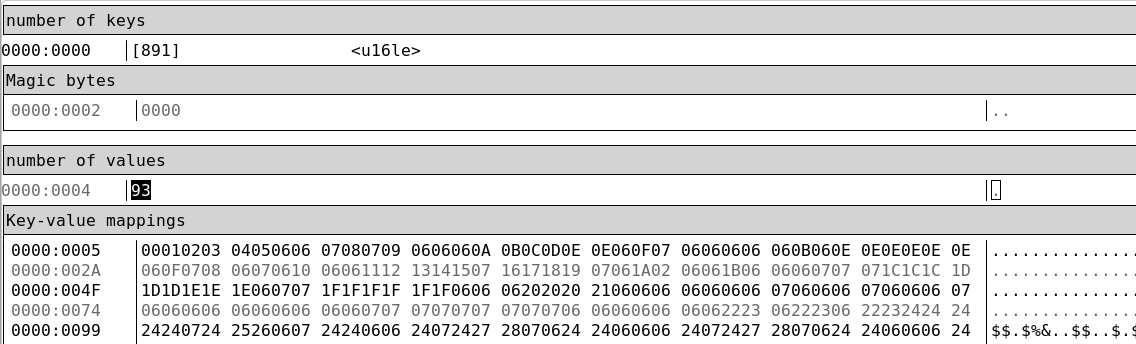
Knowing how to parse the defaults.bin I implemented the 4-step process outlined above in Python and.. it worked!!!!!!!
Final result
This all concluded in this Codeberg repository providing a Nix module and the Python-based nix_dd_wrt_appply which does to your router what nixos-rebuild switch does to your computer. I now have my homeserver and router configured in the same flake! It looks a little like this
# flake.nix
{
  inputs = {
    nixpkgs.url = "github:nixos/nixpkgs/nixos-unstable";
    flake-parts.url = "github:hercules-ci/flake-parts";
    nix-dd-wrt.url = "git+https://codeberg.org/emmabastas/nix-dd-wrt.git";
    devshell.url = "github:numtide/devshell";
  };

  outputs = inputs:
    inputs.flake-parts.lib.mkFlake { inherit inputs; }
      ({ withSystem, ... }: {
        imports = [
          inputs.devshell.flakeModule
          inputs.nix-dd-wrt.flakeModule
        ];

        # The homeserver configuration.
        flake.nixosConfigurations.homeserver = withSystem "x86_64-linux"
        ({ ... }: inputs.nixpkgs.lib.nixosSystem {
            module = [ ./homeserver.nix ];
          });

        # The router configuration.
        perSystem = { pkgs, lib, system, ... }: {
          ddWrtConfigurations.r6300 =
            import ./router.nix { inherit pkgs; };

          devshells.default.packages = [
            # The nix_dd_wrt_apply and nix_dd_wrt_setup programs.
            inputs.nix-dd-wrt.packages."${system}".default
          ];
        }
      });
}
# router.nix
{ pkgs, ... }: {
  # dd-wrt makes use of these when looking for the router on the
  # network.
  macAddresses = [ "12:34:56:78:9a" ];

  # If you change this then nix-dd-wrt will automatically
  # perform a firmware upgrade for you.
  firmware.file = pkgs.fetchurl {
    url = "https://ftp.dd-wrt.com/dd-wrtv2/downloads/betas/.../R6300.bin";
    hash = "sha256-9g9/hDMcH7883Vy+kmU1Q6snfLID9Z8JeiSl6kr6zVA=";
  };

  interfaces.wireless.wl0 = {
    enable = true;
    ssid = "MyWIFI";
    pskRaw = "🤫";
  };

  services.sshd = {
    enable = true;
    port = 22;
    passwordAuth = false;
    authorizedKeys.keys = [
      ...
    ];
  }
}
Conclusion
Reverse engineering a binary format for the first time was amazing, and using Nix and its module system for something beyond its primary use-case was a great learning experience. However, the main takeaway for me is that Nix actually isn’t all that special. Don’t get me wrong; Modeling software packages as pure functions, and using cryptographic hashes and a pure functional language like Nix to enforce purity and reproducibillity is so cool. NixPkgs is very special! But using Nix to configure a router or an operating system is not very special; At the end of the day, a program needs to read the Nix configuration and make imperative changes to the underlying machine. If that brittle collection of bash scripts that sysadmins accumulate over their careers is a turd, then NixOS is beautiful polished turd. I’d say the reason we have NixPkgs and NixOS probably only reflects the fact that people who are really into reproducible builds are also really into declarative system configurations and are ready and capable to go to great lengths to make that happen.
For my next declarative project I would want to try and use dhall instead of Nix or Guix.
Further reading
Here are some resources I found useful while working on this that I’d like to share
- liminix. OpenWRT and DD-WRT alternative made to be configurable with Nix, from the start.
- blogpost. Run NixOs on a router via external USB
- nixos-router. Configure NixOs as a router.
Comments
You can use the following Mastodon thread if you want to leave a comment. Just paste it into the search bar of whatever Mastodon instance you are on.
Footnotes
- Actually Guix is even more of a flex.